Allegiant Finance.
Detail orientated onboarding process
Overview
For many projects I work on involving application or quotation processes there is a quick-win in terms of working with the client to ensure only the most vital of fields are collected from the user, immediately simplifying the process before we even reach user research to explore other barriers.
For Allegiant, a company that supports users to claim against wrongful loans and other products, the detail is vital, in some cases legally required and without it the product would fail.
Ensuring conversion while not compromising data collection was the main objective of this project.
Role
Product (UX) Designer
Highlights
Successful implementation leading to improved conversion rates
Problem
The key to project success sat with providing the user with an accessible and usable application experience, without compromising on data collection required to make the product a success.
Strategy
Working in a small team with limited access to key stakeholders, a visual designer and development team, sprints were intensive and progress expected quickly.
I was forced to utilise existing research and rely heavily on competitor inspiration to create feature MVPs, with some opportunity to then test these with real users. I found clickable prototypes at wireframe level were invaluable to simulate the process from start to finish without placing additional time pressures on design and development resources.
User Journey Flows
In a busy working environment key stakeholders were available on a limited basis and often at obscure times of the day. To counter this I ensured deliverables were shared constantly and collaboration encouraged, utlising tools such as Miro, Invision and Slack.
Before contemplating UI the flow of the various processes involved needed to be thought through in detail with many nuances dependent on the consumer, product and a variety of other factors.
I iterated a high level flow, taking plenty of detailed on the way, into a screen flow highlighting what would be handled on each page of UI. As a successful extension and something I will use in the future, using this UI flow as a clickthrough to the relevant wireframe, and in time design, was an effective reference tool for both the client, design and development teams.
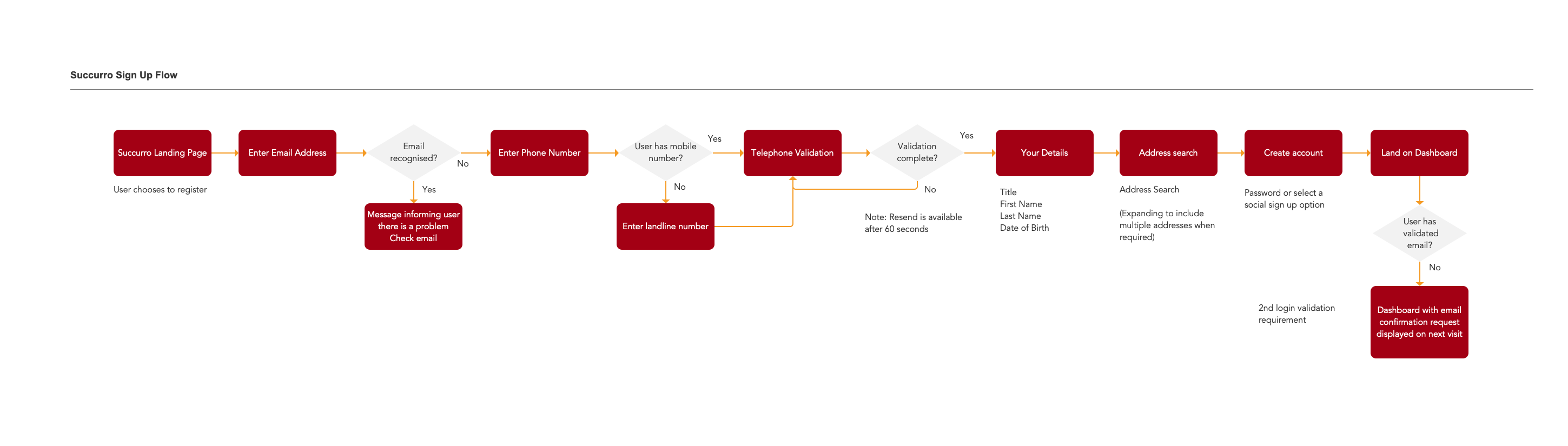
High level user flows inspired UI requirements and ultimately became navigable screen-flows to aid presentation and development
Wireframes & Prototyping
The existing platform showed a large bias toward mobile design and I worked with a mobile first viewpoint, stripping out as much as possible from the interface without compromising the data being collected.
I wanted to ensure the registration and application processes did not get tedious and result in excessive drop-off so looked to break up the process into manageable chunks with only one action on each screen as possible. The whole process was undoubtedly long with some third party interaction required, so I made the decision to complete the initial registration quickly, allow users to reach a dashboard and celebrate their success.
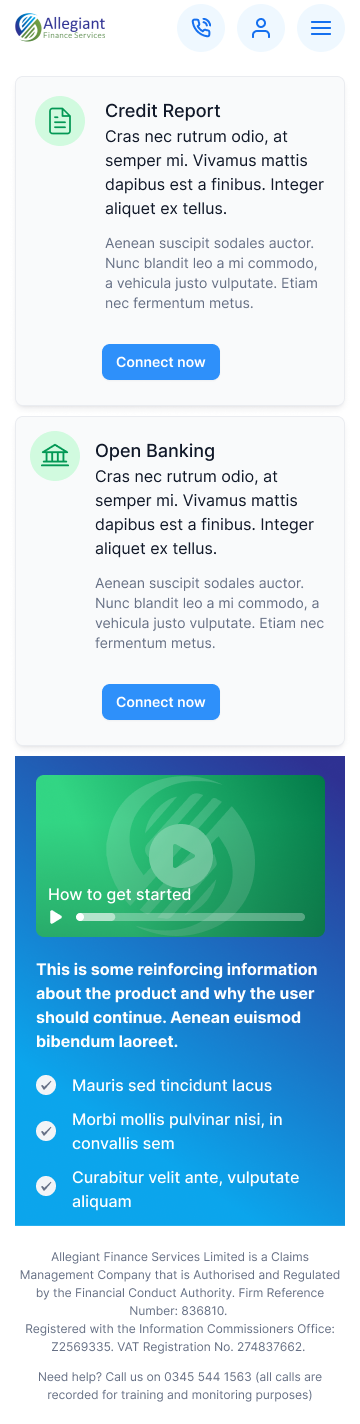
Then items that at first formed part of the registration process were instead presented as products that could be completed through the dashboard as the user required, taking some pressure off the sign up interface and reducing the psychological barrier of excessive registration forms.
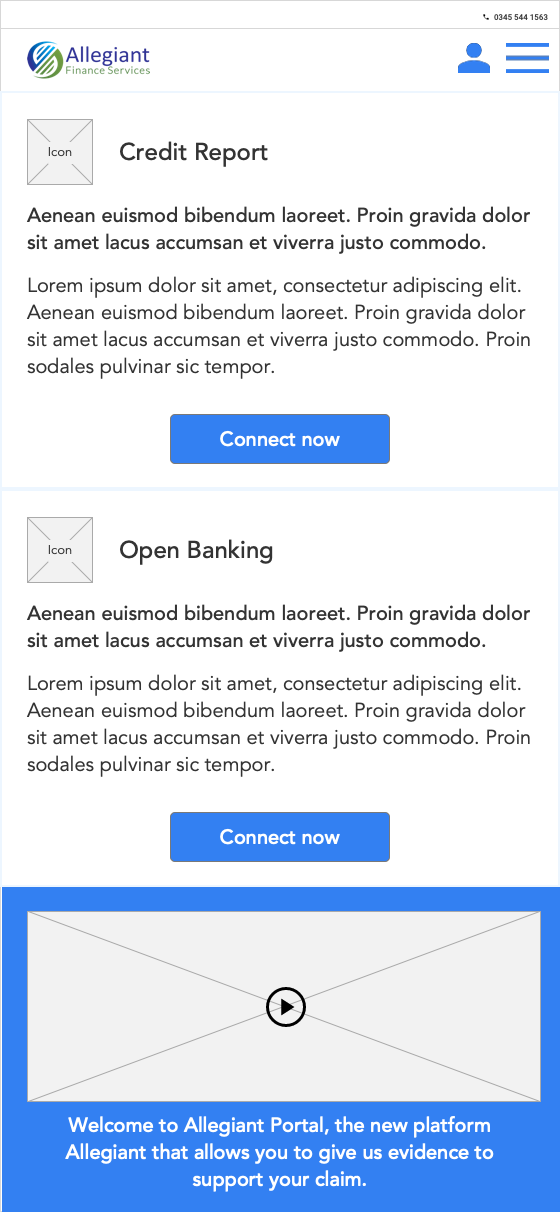
I used a tile based approach to provide a scalable method of adding products to the user dashboard
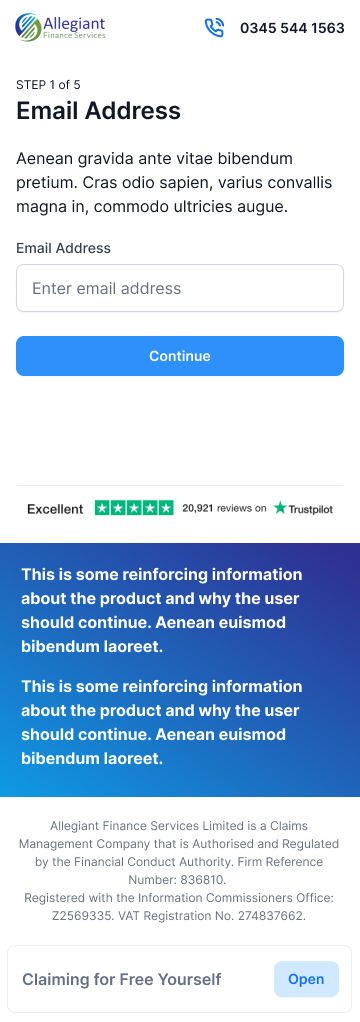
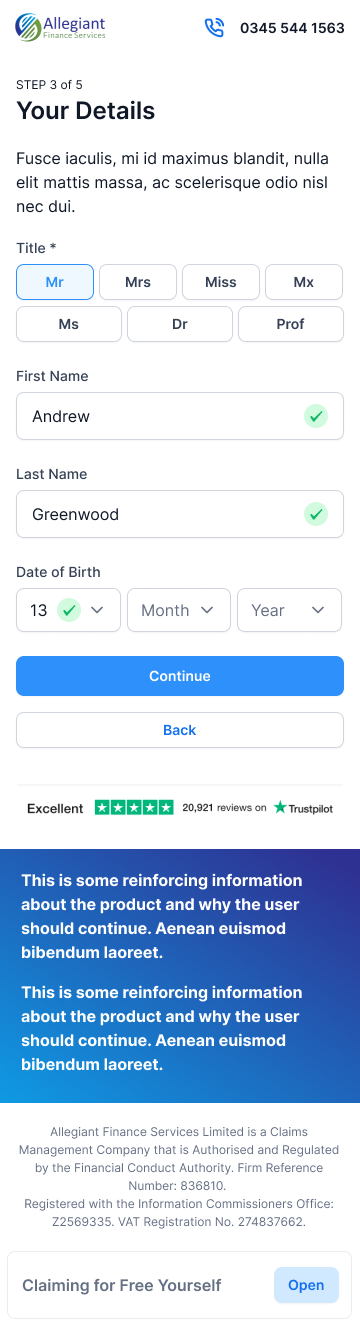
Introducing UX Specifications & Content Matrix
This is an ongoing project with regular new features and challenges. Working in a distributed team I found it challenging to effectively gather feedback and input from a varied team working on different hours. As a result I began creating design specifications, highlighting business rules, validation rules, copy and messaging and allowing back and forth with any feedback or thoughts from other team members and the project stakeholders.
These sat naturally alongside existing user stories written from a technical perspective. Wireframes and designs are always linked and link to the relevant Invision file for easy review.
Alongside a design system to ensure future features follow a consistent structure I also created a content matrix to help manage messaging for success and failure states. I had found previously it was difficult to keep on top of copy consistency and also some more obscure validation messages resulting in interactions with API. The matrix allowed documentation of everything and maintenance of a consistent brand voice when communicating with the customer.
Inspiration for future projects
I try to reflect on the positives and negatives of each project and build this into future engagements to ensure continuous improvement. Here are some areas I'll be looking to improve in the future.
01
Moving forward I will ensure to keep a record of copy and validation messaging outside of user stories alongside the design system, in order to ensure consistency when I am responsible for providing this.
02
Contributing business rules and interaction intentions within the UI into the user stories provided a more effective working relationship with the development team and has made production more efficient.